Annotation Bubble
本指南:介绍地图上常见的 Annotation 气泡(拥堵气泡、路线气泡、Smart Bubble 等)的产品含义、适用场景与 Android SDK 集成方式。
功能介绍
Annotation Bubble 是一类基于 Annotation 机制渲染的 屏幕坐标气泡,用于在地图或路线上叠加短文本、时间/距离信息、价格、路名等。与 转弯气泡(TurnBubbleFeature,由导航 step 驱动)不同,Annotation Bubble 由业务通过 AnnotationsController 创建与管理。
视觉效果由 TSS 决定:文档中的截图仅为默认主题示意。气泡的形状、颜色、渐变、字体、把手、多子层布局、摆放方位与避让规则等,均在 TSS 的 annotation 图层中通过 annotation-data、stepped(...) 及自定义变量(如 $main-text)配置。HMI 通过 API 传入 styleKey、文案与 updateFloatValue / updateStringValue,即可切换展示内容;换肤或 OEM 定制时修改 TSS 即可,无需改 Java/Kotlin 业务代码。详见 地图配色方案。
常见类型包括:
| 类型 | 典型用途 | SDK 创建方式 |
|---|---|---|
| Traffic Congestion Bubble | 沿路线展示轻度/重度拥堵及延误文案 | Annotation.ExplicitStyle + create(ExplicitStyle, Location) |
| Route Bubble | 路线上的 ETA / ETE、时差、距离、延误等 | createRouteAnnotation(routeId, styleKey) |
| Smart Bubble | 统一样式下的时间、路名、POI 价格、EV 电量等 | TSS styleKey + updateFloatValue("smart-bubble-type", …) |
气泡分类
1. Traffic Congestion Bubble(拥堵气泡)
在 导航路线 上标注拥堵区段,向驾驶员展示延误或拥堵等级文案(如「+5 分钟」)。
效果示意:
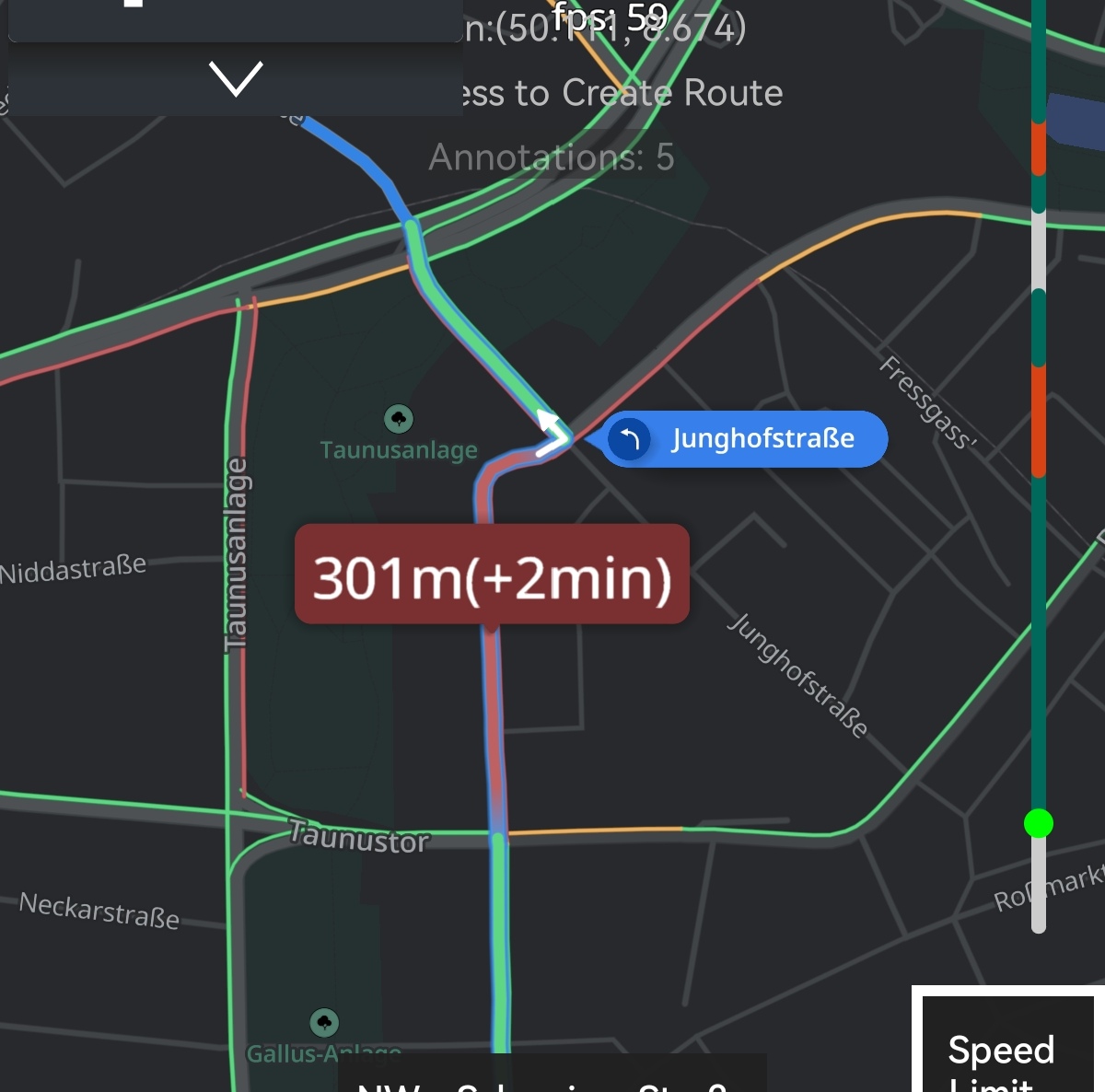
产品侧通常区分:
| 等级 | ExplicitStyle |
说明 |
|---|---|---|
| 轻度拥堵 | LightCongestionBubble |
锚定在路线拥堵点;具体配色由 TSS 定义 |
| 重度拥堵 | HeavyCongestionBubble |
锚定在路线拥堵点;具体配色由 TSS 定义 |
TSS 定制说明:
- 在 TSS 中为
custom_congestion_bubbles.heavy_congestion_bubble/light_congestion_bubble等annotation-data配置圆角、渐变、把手图标、文本对齐与优先级。 - 气泡为引擎内置矢量形状,不依赖 HMI 传入 Bitmap;宽度可随文本自适应。
- 可通过
text-color、text-size、gradient-start-color等属性调整外观;路线上的路况着色与气泡样式相互独立。
2. Route Bubble(路线气泡)
在 算路结果、路线全览 或 导航中 为每条已绘制的路线挂载气泡,锚定在路线几何上,随地图缩放/平移更新位置。气泡 不自动读取 Route 上的时间字段,具体展示什么由 HMI 格式化后写入 displayText 或 TSS 变量(如 main-text)。
效果示意:
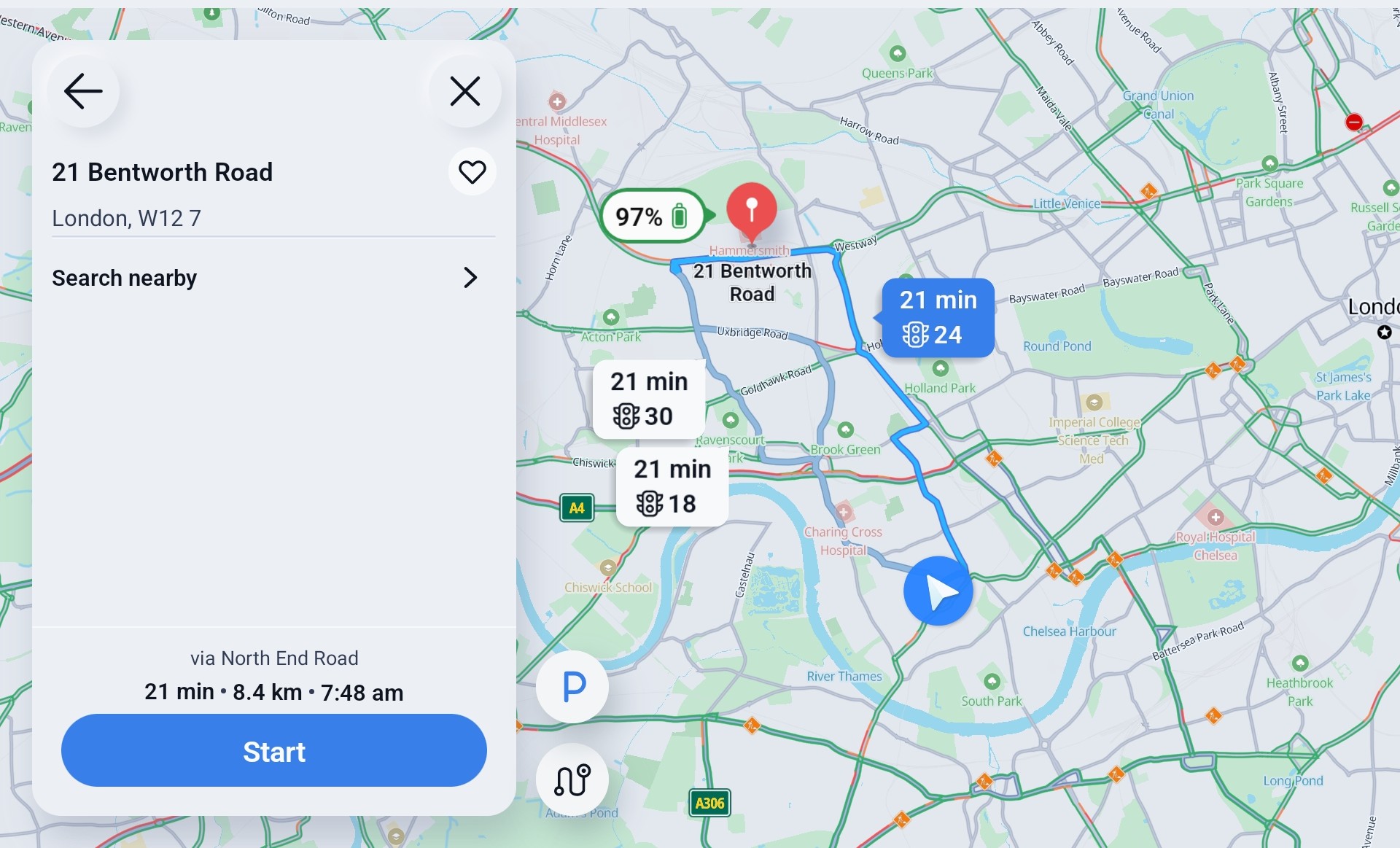
常见展示内容
| 类型 | 含义 | 典型展示 | 数据来源(示例) |
|---|---|---|---|
| ETE | Estimated Time En route,预计行驶/剩余时长 | 25 min、1 h 12 min |
Route 的 duration(秒)格式化 |
| ETA | Estimated Time of Arrival,预计到达时刻 | 14:35、下午 2:35 到达 |
当前时间 + duration,或 Route.getArrivalTimes() 末段到达时间 |
| ETA / ETE 差值 | 相对主路线或当前路线的快慢 | +3 min、-5 min、快 2 分钟 |
备选路线 etaDelta、两条路线 duration 之差 |
| 距离 | 全程或至分叉点距离 | 12.5 km、至分叉 800 m |
Route 长度、备选路线 bifurcationDistance / distanceDelta |
| 路况延误 | 相对畅通路线的额外耗时 | Traffic delay: 8 min |
Route.trafficDelay 或 duration - durationWithoutTraffic |
| 分叉引导 | 驶入备选前的提示 | To Bifurcation: 2 min |
备选路线 bifurcationTime 等 |
同一气泡可组合多段文案(如「ETE + 距离 + ETA Delta」),具体排版由 TSS 决定;主行、单位可分别映射到 $main-text、$unittext。
典型场景
- 路线选项 / 多路线全览:每条路线一个气泡,对比 ETE 或 ETA,并标注更快/更慢。
- 选中与高亮:主路线与备选路线使用不同
smart-bubble-type,区分选中/未选中样式。 - Better Route / 备选路线:展示 ETA Delta、至分叉时间/距离、距离差等。
- 导航中:可仅展示延误、剩余 ETE 等动态信息。
通过 AnnotationFactory.createRouteAnnotation 创建,与 RoutesController.addRouteLine(或 add)返回的 routeId 绑定。style 为 TSS 的 annotation-data key(常用 smart-bubble);选中态、双行文案等由 smart-bubble-type 与 TSS 共同控制。
3. Smart Bubble(智能气泡)
Smart Bubble 是一套 多子层 气泡框架:在 TSS 中为同一 styleKey(如 smart-bubble、ev-bubble)定义底板、阴影、主文本、单位、电量图标等子层;通过 smart-bubble-type(updateFloatValue)在同一套样式下切换多种布局。HMI 传入的字符串/浮点属性对应 TSS 中的 $main-text、$unittext 等变量;state、behaviour-settings(如 avoidRoutes)控制摆放方位与避让,均可按项目在 TSS 中调整。
效果示意:
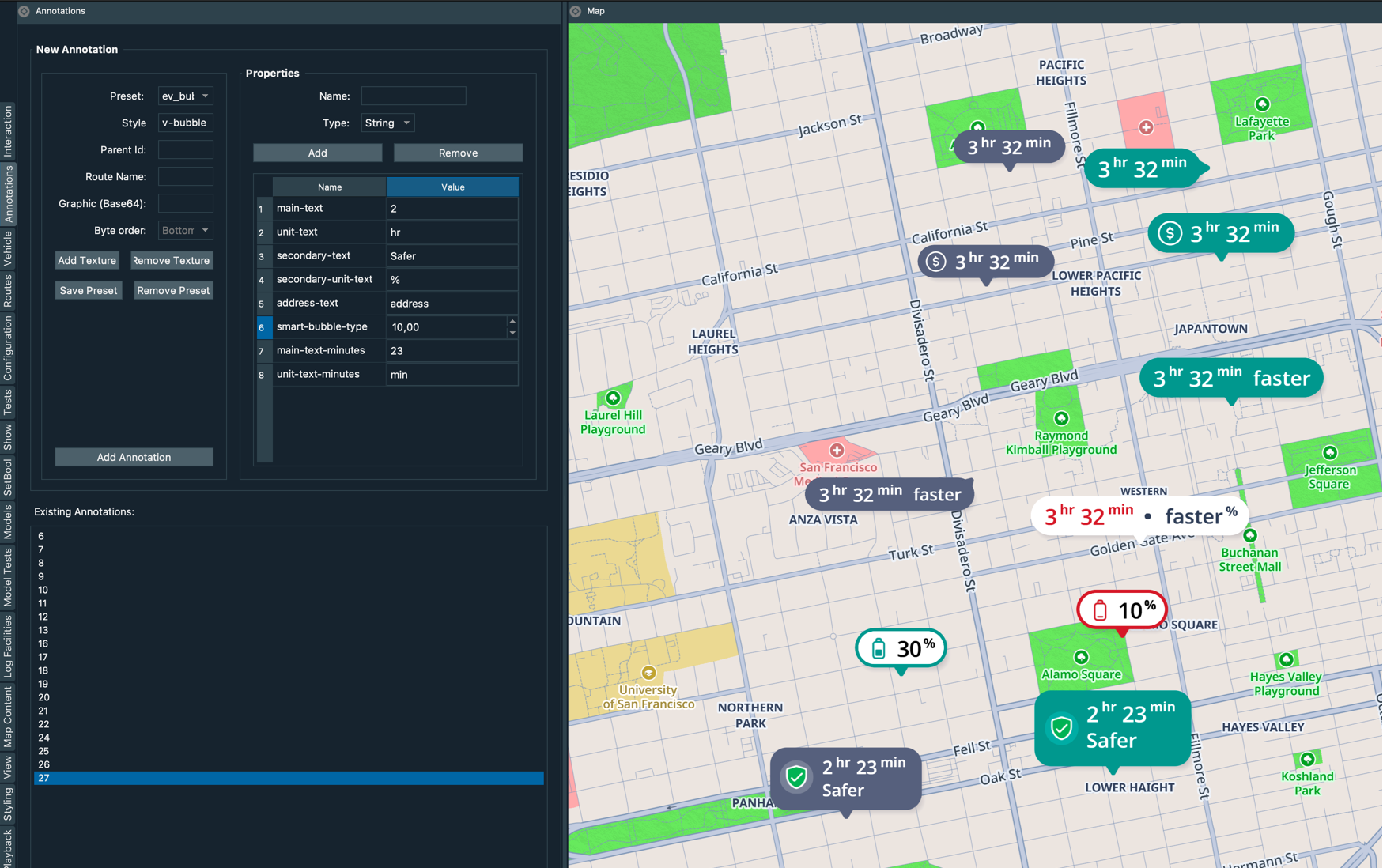
smart-bubble 常用 smart-bubble-type 取值(须与 TSS stepped(smart-bubble-type, …) 一致):
smart-bubble-type |
名称 | 说明 |
|---|---|---|
0 |
default |
默认 / 选中路线(如高亮 ETE/ETA) |
1 |
unfocused |
未选中路线 |
2 |
selected |
高亮选中态 |
3 |
two_texts |
双行文案 |
4 |
ftue |
首次引导 |
5 |
low_battery |
低电量(EV) |
另可选用 TSS 样式 "ev-bubble",通过 ev-bubble-type 切换 simple / battery 等子类型。
Smart Bubble 还可扩展展示:
- 主路线与备选路线的 ETE / ETA 对比;
- EV 电量 百分比(续航/充电规划);
- 路口 下一 maneuver 相关提示(与 Turn Bubble 产品能力有交集,实现路径不同)。
与 Turn Bubble 的区别:Turn Bubble 由
TurnBubbleFeature+ 导航legIndex/stepIndex驱动;Smart Bubble / Route Bubble 属于 Annotation,由业务创建并更新属性,外观完全由 TSS 配置。
核心接口
获取入口:
1 2 | |
| 方法 | 说明 |
|---|---|
factory.create(Annotation.ExplicitStyle, Location) |
创建拥堵等 ExplicitStyle 气泡 |
factory.createRouteAnnotation(routeId, styleKey) |
创建绑定路线的 Route Bubble |
factory.create(POIAnnotationParams) |
使用 TSS styleKey 创建 Smart Bubble 等通用标注 |
annotation.displayText |
设置居中/偏移文本(拥堵气泡、路线气泡常用) |
annotation.updateStringValue(key, value) |
更新 TSS 自定义字符串(如 main-text) |
annotation.updateFloatValue(key, value) |
更新 TSS 自定义浮点(如 smart-bubble-type) |
annotationsCtrl.add / update / remove |
增删改地图上的标注 |
ExplicitStyle 创建的气泡 不会 再受 Annotation.Style 其它枚举影响。
接口详细说明
1. 拥堵气泡 — create(ExplicitStyle, Location)
1 2 3 4 | |
| 参数 | 类型 | 说明 |
|---|---|---|
explicitStyle |
Annotation.ExplicitStyle |
HeavyCongestionBubble 或 LightCongestionBubble |
location |
Location |
气泡锚点经纬度,通常取拥堵区段代表点 |
| 返回值 | Annotation |
创建后需 add 到地图;通过 displayText 设置展示文案 |
示例代码:
1 2 3 4 5 6 7 8 9 10 11 12 13 14 15 16 17 | |
轻度/重度外观请在 TSS 中分别配置
custom_congestion_bubbles.light_congestion_bubble与heavy_congestion_bubble。
2. 路线气泡 — createRouteAnnotation
1 2 3 4 | |
| 参数 | 类型 | 说明 |
|---|---|---|
routeID |
String |
RoutesController.addRouteLine 返回的路线 ID |
style |
String |
TSS 中路线气泡的 styleKey / annotation-data(如 smart-bubble 或项目自定义 route-eta 样式) |
| 返回值 | Annotation |
气泡沿路线锚定,路线移除后应同步 remove |
示例代码 — 多路线全览(ETE / ETA 文案):
1 2 3 4 5 6 7 8 9 10 11 12 13 14 15 16 17 18 19 20 21 22 23 24 25 26 27 28 29 30 31 32 33 34 35 | |
formatEta需java.text.SimpleDateFormat等;若算路结果已提供Route.getArrivalTimes(),可直接取目的地到达时刻作为 ETA 展示。
示例代码 — 点击路线切换高亮与气泡类型:
1 2 3 4 5 6 7 | |
示例代码 — 导航中展示路况延误(ETE 相关):
1 2 3 4 5 6 7 8 9 10 11 | |
示例代码 — 备选路线(分叉时间、ETA Delta、距离差):
1 2 3 4 5 6 7 8 9 10 11 12 | |
3. Smart Bubble — POIAnnotationParams + 自定义属性
1 | |
| 字段 | 说明 |
|---|---|
params.styleKey |
TSS 样式 key,Smart Bubble 常用 "smart-bubble" |
params.location |
锚点位置;路线类 Smart Bubble 仍可用 createRouteAnnotation |
params.text |
主文本(也可通过 updateStringValue("main-text", …) 更新) |
Smart Bubble 常用自定义键(须与 TSS 中 $变量 一致):
| 键 | 类型 | 说明 |
|---|---|---|
smart-bubble-type |
Float |
子类型:0 选中、1 未选中等(路线气泡常配合 ETE/ETA 样式) |
main-text |
String |
主文案(ETE、ETA、路名、价格等) |
unittext |
String |
单位(如 min、km) |
示例代码 — Smart / EV POI 气泡:
1 2 3 4 5 6 7 8 9 10 11 12 13 14 15 16 17 18 19 20 21 | |
4. 导航沿线路况拥堵气泡 — onAlongRouteTrafficUpdated
导航中根据 AlongRouteTraffic 在拥堵区段中点创建气泡,驶过后按 legIndex / stepIndex / edgeIndex 移除。
1 2 3 4 5 6 7 8 9 10 11 12 13 14 15 16 17 18 19 20 21 22 23 24 25 26 27 28 29 30 31 32 33 34 35 36 37 38 39 40 41 42 43 44 45 | |
在
NavigationEventListener.onAlongRouteTrafficUpdated中刷新气泡,并配合routesController.refreshAlongRouteTraffic更新路线着色,见 路线渲染。
TSS 样式定制
三类气泡的 最终显示效果均在 TSS 中定义;API 只负责创建标注、绑定路线/位置并传入动态文案与类型参数。换肤或 OEM 差异通过替换/修改 TSS 资源包完成,参见 地图配色方案。
Smart / Route / EV 气泡
在 TSS 中使用 annotation 图层,以 annotation-data 区分样式 key,例如:
1 2 3 4 5 6 7 8 9 | |
| 定制项 | TSS 侧 | API 侧 |
|---|---|---|
| 底板、圆角、阴影 | shape-size、rounded-corners、shadow-* |
— |
| 主文案、单位 | text: $main-text、text: $unittext |
updateStringValue("main-text", …) |
| 选中/未选中/EV 等形态 | stepped(smart-bubble-type, [...]) 或多套 annotation-data |
updateFloatValue("smart-bubble-type", …) |
| 叠放顺序 | 各子层 priority(与书写顺序无关) |
— |
| 是否显示 | layer_order 中注册图层名 |
add / remove |
拥堵气泡(ExplicitStyle)
HeavyCongestionBubble / LightCongestionBubble 映射到 TSS 中 custom_congestion_bubbles.* 节点,可配置渐变(gradient-start-color / gradient-end-color)、把手(icon-image)、文本(text、text-alignment)等。业务侧用 displayText 或 TSS 变量传入延误文案;颜色与字号以 TSS 为准,displayText 上的 textColor / textSize 可按项目覆盖。
使用流程
- 地图
onReady后获取AnnotationsController与AnnotationFactory。 - 使用 路线渲染 绘制路线并取得
routeId。 - 按类型调用
create/createRouteAnnotation,设置displayText及updateFloatValue/updateStringValue。 annotationsController.add显示;路线点击时更新smart-bubble-type(改 float 属性后引擎会刷新,通常无需再update)。- 路线移除、导航结束或重算路时
remove对应标注。 - 需要交互时注册
setOnAnnotationTouchListener、setOnRouteTouchListener,见 触摸与手势。
注意事项
- ExplicitStyle 与 Style 互斥:拥堵气泡使用
HeavyCongestionBubble/LightCongestionBubble后,不要再对其setStyle为普通ScreenAnnotationPopup。 - 拥堵文案:示例统一用
Annotation.TextDisplayInfo.Centered(text)设置displayText,并可选textColor、textSize。 - routeId 生命周期:
createRouteAnnotation的routeID必须在路线仍存在于RoutesController时有效;remove(routeId)后应移除对应气泡。 - TSS 与 API 键名一致:
styleKey、smart-bubble-type及$变量名须与当前加载的 TSS 文件一致;定制显示效果时优先改 TSS,再核对 API 传入的 key 与取值。 - 勿与
clear()混用:AnnotationsController.clear()会清除 全部 标注(含其他模块),多业务共存时优先对列表remove。 - Turn Bubble:逐步转向引导请优先使用 转弯气泡;路名气泡若产品指定为 Smart Bubble,需与 Turn Bubble 在 UI 上避免重复堆叠。