路口放大图
本指南:使用 TnIntersectionView 渲染导航下发的路口放大图数据。
功能介绍
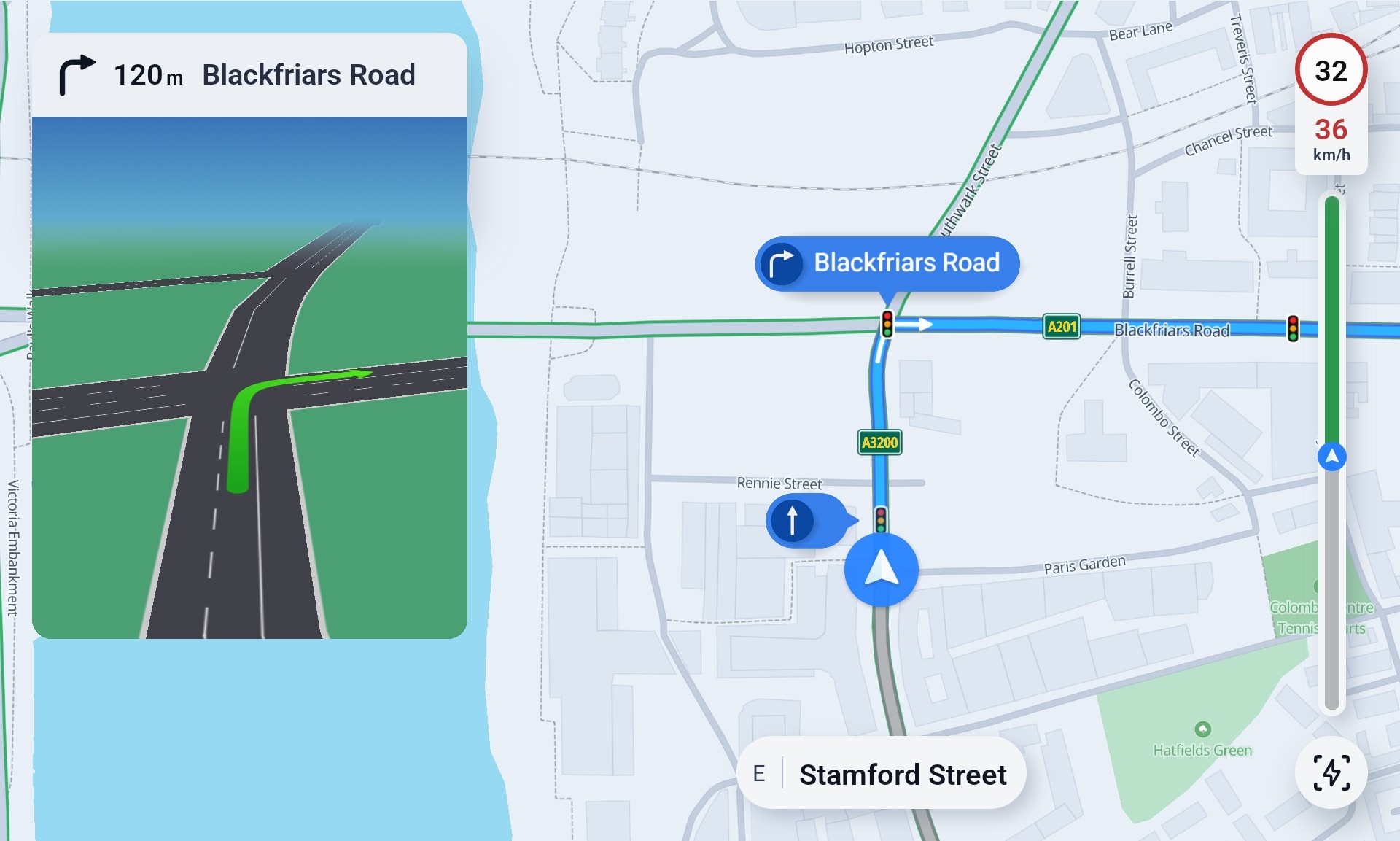
路口放大图(Intersection View)用于在复杂路口、匝道或多车道分歧点展示局部引导画面。视图只负责 渲染;路口与引导数据由 导航模块 以二进制形式下发,HMI 监听导航事件后传入 addIntersectionViewData。
| 项 |
说明 |
| 实现类 |
TnIntersectionView |
| 渲染目标 |
外部传入的 Surface(常见为 TextureView) |
| 初始化 |
IntersectionViewParams |
| 数据接口 |
addIntersectionViewData / clearIntersectionViewData |
| 样式 |
推荐 styles/intersection_view/newstyle.tss,见 地图配色方案 |
效果示意:
获取入口:
| val intersectionView = TnIntersectionView()
|
核心接口一览
| 方法 |
说明 |
initialize(IntersectionViewParams) |
初始化 |
onSurfaceCreated/Changed/Destroyed |
Surface 生命周期 |
onResume/onPause/onDestroy |
对齐 Activity 生命周期 |
addIntersectionViewData(data, listener) |
添加并渲染路口图数据 |
clearIntersectionViewData() |
清除路口图 |
setFPS(fps) |
帧率,默认 30 |
themeController() / cameraController() / vehicleController() |
控制器访问(onReady 之后) |
接口详细说明
1. initialize — 初始化
在 Surface 可用后创建 TnIntersectionView 并调用 initialize,随后调用 onSurfaceCreated()。
| fun initialize(intersectionViewParams: IntersectionViewParams)
|
| 参数 |
类型 |
说明 |
context |
Context |
建议 applicationContext |
surface |
Surface |
渲染目标 |
width / height |
Int |
逻辑尺寸(像素) |
density |
Float |
屏幕密度 |
defaultLocation |
LatLon |
初始中心 |
createCVP |
Boolean |
是否创建默认 CVP |
zoomLevel |
Float |
初始缩放 |
viewOptions |
ViewOptions? |
常用 styles/intersection_view/newstyle.tss |
readyListener |
MapViewReadyListener<IntersectionView?>? |
就绪回调 |
初始化顺序:initialize(params) → onSurfaceCreated() → onReady 中配置 Controller。
2. Surface 与 Activity 生命周期
| 方法 |
调用时机 |
onSurfaceCreated() |
Surface 首次创建 |
onSurfaceChanged(width, height) |
尺寸变化 |
onSurfaceDestroyed() |
Surface 销毁 |
onResume() / onPause() / onDestroy() |
对齐 Activity |
时序与 多屏显示 中 ClusterMapView 的 TextureView 用法相同。
3. addIntersectionViewData — 渲染路口图
| fun addIntersectionViewData(
intersectionData: ByteArray,
renderListener: IntersectionRenderListener
): Boolean
|
| 参数 |
类型 |
说明 |
intersectionData |
ByteArray |
导航下发的路口图二进制数据 |
renderListener |
IntersectionRenderListener |
渲染完成回调(onIntersectionRendered) |
| 返回值 |
Boolean |
接口返回值,业务方可按需使用 |
4. clearIntersectionViewData — 清除路口图
| fun clearIntersectionViewData()
|
移除当前路口图数据,路口通过或不再需要展示时调用。
导航数据与显示流程
路口图数据来自导航模块,通过 GuidanceEventListener.onIntersectionGuidanceInfoUpdated 推送 IntersectionGuidanceInfo。
| 字段 / 状态 |
说明 |
Status.DETECTED |
检测到路口引导;使用 detailedIntersectionGuidanceInfo.data 渲染 |
detailedIntersectionGuidanceInfo.data |
ByteArray,传给 addIntersectionViewData |
Status.PASSED |
已通过路口;调用 clearIntersectionViewData() 并隐藏容器 |
注册导航监听(须在导航服务 eventHub 上注册):
| navigationService.eventHub.addGuidanceEventListener(object : GuidanceEventListener {
override fun onIntersectionGuidanceInfoUpdated(info: IntersectionGuidanceInfo) {
onIntersectionGuidanceUpdated(info)
}
})
|
推荐流程:
| ① 导航中启用 intersection guidance
② Surface 就绪 → TnIntersectionView.initialize + onSurfaceCreated
③ DETECTED → addIntersectionViewData(data) → 显示路口图容器
④ PASSED → clearIntersectionViewData() → 隐藏容器
|
集成示例
1
2
3
4
5
6
7
8
9
10
11
12
13
14
15
16
17
18
19
20
21
22
23
24
25
26
27
28
29
30
31
32
33
34
35
36
37
38
39
40
41
42
43
44
45
46
47
48
49
50
51
52
53
54
55
56
57
58
59
60
61
62
63
64 | class IntersectionViewHost(
private val textureView: TextureView,
private val context: Context
) {
private var intersectionView: TnIntersectionView? = null
fun start() {
textureView.surfaceTextureListener = object : TextureView.SurfaceTextureListener {
override fun onSurfaceTextureAvailable(st: SurfaceTexture, w: Int, h: Int) {
val surface = Surface(st)
intersectionView = TnIntersectionView().apply {
initialize(
IntersectionViewParams(
context = context.applicationContext,
surface = surface,
width = w,
height = h,
density = context.resources.displayMetrics.density,
viewOptions = ViewOptions(
stylePath = "styles/intersection_view/newstyle.tss"
)
)
)
onSurfaceCreated()
}
}
override fun onSurfaceTextureSizeChanged(st: SurfaceTexture, w: Int, h: Int) {
intersectionView?.onSurfaceChanged(w, h)
}
override fun onSurfaceTextureDestroyed(st: SurfaceTexture): Boolean {
intersectionView?.onSurfaceDestroyed()
intersectionView?.onDestroy()
intersectionView = null
return true
}
override fun onSurfaceTextureUpdated(st: SurfaceTexture) {}
}
}
fun onIntersectionGuidanceUpdated(info: IntersectionGuidanceInfo) {
val view = intersectionView ?: return
when (info.status) {
IntersectionGuidanceInfo.Status.DETECTED -> {
val data = info.detailedIntersectionGuidanceInfo?.data ?: return
showIntersectionContainer()
view.addIntersectionViewData(
data,
object : IntersectionRenderListener {
override fun onIntersectionRendered() {
hideLoadingIndicator()
}
}
)
}
IntersectionGuidanceInfo.Status.PASSED -> {
view.clearIntersectionViewData()
hideIntersectionContainer()
}
}
}
}
|
注意事项
- 数据与渲染分离:
IntersectionView 不发起算路或路口检测,仅渲染导航下发的 ByteArray。
- 初始化顺序:先
initialize,再 onSurfaceCreated();销毁时先 onSurfaceDestroyed(),再 onDestroy()。
- Controller 时机:
cameraController() 等须在 onReady 之后调用。
- 独立样式:路口图使用
styles/intersection_view/newstyle.tss,与中控/仪表盘 TSS 分开配置。
相关指南